Setting up
sudo apt-get install git
Configuring the username
git config --global user.name "FIRST_NAME LAST_NAME"
Specifying the email
git config --global user.email "MY_NAME@example.com"
Generating an ssh key
ssh-keygen
Press enter for all prompts
Starting the ssh agent
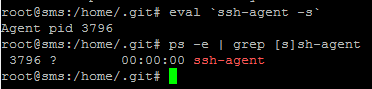
eval `ssh-agent -s`
And checking that it has started
ps -e | grep [s]sh-agent
You should see something like this
Adding the key to the ssh-agent
ssh-add /root/.ssh/id_rsa
- Open the website bitbucket.org in your browser
- Log in, if you are not registered, then register
- Click on the icon in the lower right corner, and select Bitbucket settings from the dropdown menu
- In the opened menu, select "SSH keys" and click add
- In the terminal, execute
cat ~/.ssh/id_rsa.pub
- Copy the result of the command and paste it into the window in the browser.
- Click add key
- Then return to the console and output the contents of the key with the command
cat /root/.ssh/id_rsa.pub
- Copy the obtained key into the browser
- Click add
That's all, just clone your project from Bitbucket, for this you need to go to the directory where your site should be located, and execute in the terminal :
git clone git@bitbucket.org:Your_login/your_repo.git
git commit -m 'test'
|
git push origin master uploads to the server
git pull retrieves from the server.
A version for centos will be available soon
For more details on how to work with git, visit the sites: githowto.com and git-scm.com